User guide
Pick an engine, run the quickstart, process a flight, check and read the output.
See also Configuration for the run file · Validation for how agreement is counted · Glossary for cells, bins and denominators.
Pick an engine
| Engine | Use it for | Run it with |
|---|---|---|
| UIOOPS v3.5 (default) | any new data, any probe | arrayprobe run <config.toml> <raw> with [run].engine = "3.5", or run_flight.py <raw> --preset <name> --engine 3.5 --profile stock-v3.5 --tas-file <aircraft.nc> --borrowed-combine --out <dir> |
| SODA-2 (NCAR's IDL chain) | a second, independent processing of the same raw file | arrayprobe soda2 run <config.toml> --out <dir> [--jobs N] |
From Python (the entry point is documented in the selector API), arrayprobe.engine() returns v3.5 and arrayprobe.engine("soda2") the SODA-2 port; An earlier translation of UIOOPS v3.1.4 reproduced archived products and is not part of this package (Choosing an engine). arrayprobe engines --catalogue lists which package implements each module. run_flight.py requires the engine and the preset; a v3.5 2D-S run also needs an aircraft file (--tas-file) and --borrowed-combine (recorded in the .call), because no stock v3.5 release has a combine.
Quickstart — no campaign data required
Needs a clone and the venv from Installation; the same commands are in examples/start_here/README.md. make-demo-flight builds a synthetic raw .2DS file and the aircraft airspeed file engine 3.5 needs (base160101000000.aircraft.cdf, a rescaled excerpt of public ARM aircraft data). examples/start_here/run.toml names the engine (3.5), the DEMO_2DS_H preset and the stock-v3.5 profile, and runs decode → frame → size distribution → combine:
cd arrayprobe   # the repository root
# Windows paths throughout this page; on Linux / macOS use .venv/bin/python
mkdir -p examples/start_here/output     # Linux, macOS, PowerShell (re-runnable); in Windows cmd: if not exist examples\start_here\output mkdir examples\start_here\output
.venv/Scripts/python.exe -m arrayprobe make-demo-flight --dense examples/start_here/output/base160101000000.2DS
.venv/Scripts/python.exe -m arrayprobe run examples/start_here/run.toml examples/start_here/output/base160101000000.2DS --yes
The run prints ALL DONE and writes into examples/start_here/output/ (untracked); the final product is examples/start_here/output/base160101000000.combined.H.2DS.cdf. The TOML's paths are relative to the TOML.
--yesaccepts the printed configuration in advance. A run with no threshold policy (--regime liquid-warm, or a[thresholds]section) asks first, becausestockthresholds are tuned for warm liquid cloud; without a terminal it refuses.--dry-runprints the block and stops.--densewrites 12 particles per second across used bins 6–40; of 60 decoded particles, engine 3.5 counts 48 into used bins. Without it, the four particles land in the first bin.- The demo 2D-S is sized on the 2D-S 128-bin ladder. Stock v3.5's
sizeDist.mhas no case for theDEMOproject and would fall to the HVPS table (28 bins, 0.2–30 mm). Engine 3.5 corrects this by default and records it in the stamp (bins=2ds-ladder(...));--protective offkeeps the stock table. - The file is large and mostly NaN, faithfully. About 68 MB; its
timedimension is 22,004 seconds, four with data: the stem's summary time (00:00:00) predates the records (06:06:40), and combine pads the gap with NaN, ascombine_sizedist.mdoes. Naming the filebase160101060640.2DSgives a 17 KB, 4-second product; the whole-file NaN drops from 99.72 % to 24.32 %, counts unchanged. - Four rows, not five: the SPEC reader never treats a file's last record as a primary.
- Not validated science (Validation).
examples/3_validation/01_validate_against_a_product.ipynb compares your run with the tracked reference (tests/data/demo_flight_v35_*).
Real-data tour — a genuinely recorded flight, no campaign access needed
ImagefileExamplePECAN is UIOOPS's own example: 300 real CIP/PIP records from PECAN. Its terms are undetermined, so fetch it from UIOOPS, from the repository root, with the GitHub CLI (gh, authenticated) or by extracting the v3.5 tarball from the UIOOPS release page the same way:
mkdir -p UIOPS-v3.5/joefinlon-UIOPS-039be82
gh api repos/joefinlon/UIOPS/tarball/v3.5 > uiops-v3.5.tar.gz
tar -xzf uiops-v3.5.tar.gz --wildcards --strip-components=1 -C UIOPS-v3.5/joefinlon-UIOPS-039be82 \
    '*/ImagefileExamplePECAN'
Then decode it:
copy the run-file template examples/configs/cip_uiops/cip_run.toml to pecan_run.toml, keep [run].engine = "3.5", set [run].stages = "2" (decode only) and name the DMT format for this file, then run it from the repository root:
.venv/bin/python -m arrayprobe run pecan_run.toml UIOPS-v3.5/joefinlon-UIOPS-039be82/ImagefileExamplePECAN          # Linux, macOS
.venv\Scripts\python.exe -m arrayprobe run pecan_run.toml UIOPS-v3.5/joefinlon-UIOPS-039be82/ImagefileExamplePECAN  # Windows
This writes 300 records to the decoded image file and its .call stamp. The tour stops there: image processing on v3.5 needs the aircraft's airspeed, which a DMT file does not carry. For your own flight, write it with arrayprobe make-tas-file and run arrayprobe run <config.toml>; examples/configs/cip_uiops/cip_run.toml is the template.
Process a flight
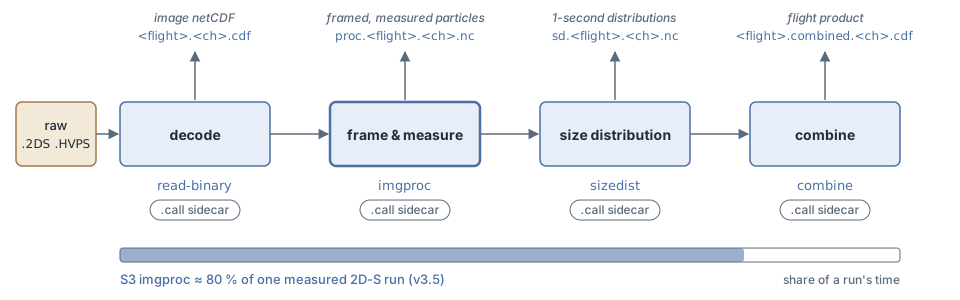
arrayprobe run <config.toml> runs four internal stages, chosen with [run].stages: decode reads a raw file, image processing frames particles out of it, size distribution computes one-second distributions, and combine stitches a flight's files into one product. SPEC, DMT, PMS and SEA raw formats are supported; a new campaign is a configuration row, not a code change (Conventions).
raw .2DS / .HVPS   decode       =>  <flight>.<ch>.nc           (image netCDF)
                   image proc.  =>  proc.<flight>.<ch>.nc      (framed and measured particles)
                   size dist.   =>  sd.<flight>.<ch>.nc        (1-second size distributions)
                   combine      =>  <flight>.combined.<ch>.cdf (the flight's product)
Engine 3.5 names its 2D-S/HVPS decode <flight>.<ch>.nc, as v3.5's read_binary_SPEC.m does.
One line to run, one file to configure — engine, fidelity profile, campaign preset and output directory are named in the file (this example uses the start-here demo's file, which names the v3.5 engine):
.venv/Scripts/python.exe -m arrayprobe.cli run examples/start_here/run.toml examples/start_here/output/base160101000000.2DS --yesCampaign constants are one preset chosen by name (--preset); a campaign the driver does not ship goes in your own TOML file, passed with --presets (Configuration). The same run, calling scripts/run_flight.py directly:
cd arrayprobe   # the repository root
.venv/Scripts/python.exe scripts/run_flight.py --preset DEMO_2DS_H --engine 3.5 --profile stock-v3.5 --tas-source auto --regime liquid-warm --yes ../<flight>*.2DS
This runs the v3.5 engine on 2D-S files with the shipped demo preset (DEMO_2DS_H); name your own campaign's preset instead; --tas-source auto supplies the aircraft airspeed a v3.5 2D-S run needs. For your own data, see Pick an engine. The driver decodes each raw file, runs imgProc_sm and sizeDist, combines, and writes a .call sidecar per output recording how it was invoked. --stages 34 skips decoding; --diode-corrected writes a confirmed stuck-diode mask to a separate file. --jobs 2 runs two files at once; --s2-jobs 6 splits one large file's decode (a dense 157 MB file: 498 s → 153 s). Both default to serial and live in the port, not the enhancements, because they move no written byte. --tas-ratio on (engine 3.5, needs --tas-source or --tas-file) works with --s2-jobs and equals the serial decode. The driver checks every input is readable before stage 2 (exit 1 if not).
Stray-pixel correction (engine 3.5, on by default). UIOOPS sizes an image as a whole, so a particle plus a few far-off stray pixels is sized too large. Engine 3.5 removes groups of at most 2 pixels lying more than 8 empty diodes from a single main piece of at least 9 pixels, sizes the main piece alone and writes each image's removed count to image_stray_pixels_removed. Turn it off with --stray-pixel off or [enhancements] stray_pixel_fix = false (the command line wins); the .call stamp records stray_pixel=on:g8,n2,m9 or stray_pixel=off. Worked examples: examples/5_data_quality/04_stray_pixel_images.ipynb.
Process a flight with SODA-2
arrayprobe soda2 run reads a config with [run].engine = "soda2" and a [soda2] table of SODA-2's op fields under their IDL names (fn the raw file, outdir, date, starttime, stoptime, probetype, res, endbins, …); a complete table is on Migrating from SODA-2.
python -m arrayprobe soda2 run soda2.toml --out soda2_out
python -m arrayprobe soda2 run soda2.toml --out soda2_out --jobs 4
python -m arrayprobe soda2 enhancements
It writes SODA-2's per-particle files (CSV and netCDF) and a <stem>.pbp.call sidecar; asciipsdfile = 1 adds SODA-2's ASCII size-distribution .txt. --jobs N splits the buffer loop byte-identically to serial and exits 2 where it cannot (stuckbits, activetimefrommissed, more than one raw file); --jit is a byte-identical speed-up. With arrayprobe-soda2-enhancements installed, corrections resolved ON are applied and recorded in the sidecar. Exit 2 for a config it cannot run, 1 when the driver returns no data (From a SODA-2 batch script).
Or drive each stage
combine is a subcommand. Decode, image processing and the size distribution take choices a flag line cannot carry (software string, airspeed series, reject thresholds, output switches), so they run as arrayprobe run <config.toml> with [run].engine = "3.5" and [run].stages set to "2", "3" or "4" ("234" for all three; examples/start_here/run.toml is the template):
python -m arrayprobe.cli combine sd.H.nc base160906064017.combined.H.2DS.cdf --flight-date 20160906 --summary-time 16_09_06_06_40_17 --engine 3.5 --borrowed-combine- The chunking and the
d_choiceandsa_methodchoices (they change the science, Configuration) come from the preset the run names. combine:--summary-timeis the summary file'sYY_MM_DD_HH_MM_SSbasename; on--engine 3.5,--borrowed-combineis required.intarr-thresholdturns aprocfile into the optional inter-arrival threshold filesizedisttakes as its twelfth argument.
Which enhancements act where: Enhancements by stage. Arguments that matter more than they look:
- The twelfth
sizeDistargument. Any threshold file — even one that does not exist — enables shattering removal on the per-probe default; none skips it and accepts ~58 % more particles. The.callsidecar records which. ia_thresh_type:0per-probe default,1the file's per-second values,2its flight-wide value.- Diode masks are off by default;
--diode-correctedwrites a separate file. - Shattering reacceptance scans only each set's first event at two of v3.5's three reacceptance sites (a finding).
Check the output
.venv/Scripts/python.exe -m arrayprobe reprocess examples/start_here/output/sd.base160101000000.H.nc --preset DEMO_2DS_Hreprocess re-runs a stage under its .call sidecar's configuration and diffs: exit 0 and IDENTICAL, or the first disagreement; no reference product needed. Add --tas-file for a proc product whose stamp names one; an sd product refuses it, because stage 4 never reads it.
import arrayprobe
result = arrayprobe.compare_to_product("combined.cdf", "reference.cdf")
This compares a combined product with an archived, MATLAB-written one under both denominators; examples/3_validation/01_validate_against_a_product.ipynb#validate-your-own-run walks through it for two files you supply.
Checking raw files before processing. arrayprobe inventory <dir> --out <stem> [--format spec|dmt|pms_2d] reads the raw bytes of every file in a directory (or one file) and writes <stem>.json and <stem>.csv, one row per file, so empty and truncated files are found before a long run. It computes no product and changes nothing. Without --format the record format is guessed per file.
Sharing a product with its provenance. arrayprobe attributed <source> [out] writes a second file beside a faithful product, carrying the same values, the whole .call sidecar and a sourced unit on every variable; the faithful product is opened read-only. With --layout particles it instead reads a proc (per-particle) file and writes one Parquet table, one row per particle (default <source>.particles.parquet); this needs the [parquet] extra. --layout dimensions (the default) writes the netCDF sibling.
Reading the output
The sd file carries units on every variable (Conventions and terms). The combined product has none, nor global attributes, because combine_sizedist.m writes none:
| Variable | Dimensions | Units | Note |
|---|---|---|---|
Time Vector | time | MATLAB datenum (days since year 0) | 736331.0 is the first second of 2016-01-02; the sd file's time is HHMMSS |
Bin Minimum, Bin Maximum, Bin Midpoints, Bin Width | bin_count | millimetres | |
Counts | time × bin_count | count | particles accepted per bin per second |
Size Distribution cm-3 | time × bin_count | cm⁻⁴ | per unit size, despite MATLAB's name |
Number Concentration cm-3 | time | cm⁻³ | |
Mean Area Ratio | time × bin_count | dimensionless | |
Reject Ratio | time | dimensionless | |
files_stitched | (a dimension) | — | raw files in the product |
Bins 1–5 are unused by convention (bins 6–128). Raw contracts a Python caller meets (a decode's last record, three-valued touching_edge, the terminator-less .MK.csv) are in Conventions and terms; arrayprobe.friendly (API) re-views each without new computation.